How to backtest on MT5: step by step with real ticks
By Fernando Funicelli · Founder of Lucky Dogs Trading Systems
Backtesting on MT5 means running a robot (EA) on price history inside the Strategy Tester, the strategy testing tool that comes with MetaTrader 5 (Ctrl+R), to see what it would have done, trade by trade. Done with real ticks, it uses every price your broker recorded.
The first backtest is usually quick and exciting. You pick the robot, click Start and, within seconds, a curve climbs from left to right. The urge is to switch the robot on in your account right away.
Before that, try an experiment: run the same robot, over the same dates, changing only the modelling. The result changes, sometimes by a lot. Three choices almost nobody looks at decide the final number: the modelling, the cost and the period.
A test that is too fast can show profit that never existed. Inside a 1-minute candle, gold can touch both the stop and the target, and only the real tick says which of the two came first.
The rule that fixes this: a backtest is only as real as the prices it uses.
Backtest: what it is and what it proves
A backtest, or backtesting, is testing a trading rule on the past. In trading, it answers three questions before you risk money:
- Does the rule repeat across the history, or did it win in one stretch only?
- How far did the account fall along the way, from peak to trough?
- In which months did it win, and in which did it lose?
What it doesn't answer: the future and live execution. Slippage (the difference between the price requested and the price filled), the spread in the second of the news and the day the terminal was switched off don't show up in the history. For that there are the forward test and the demo account, further down, and the guide on why a real account's result differs, and how much is normal.
A well-run backtest doesn't predict next month. It shows, without opinion, how the rule behaved in every month you chose to look at. It is the best information there is before you switch a robot on.
What you need before your first backtest
- MetaTrader 5 on your computer. The Strategy Tester belongs to desktop MT5: the phone app has no tester.
- An account at the broker you will trade with. A demo is enough. The tester downloads the history of the broker MT5 is connected to, so the test already comes out with that broker's prices.
- The EA in the MT5 Navigator (Ctrl+N): bought, the free demo from the Market or an .ex5 file. If it isn't there yet, see how to install a robot (EA) on MT5.
- Patience on the first test. The first test of a period downloads the tick history and takes longer; the following ones are fast.
How to backtest on MT5, step by step
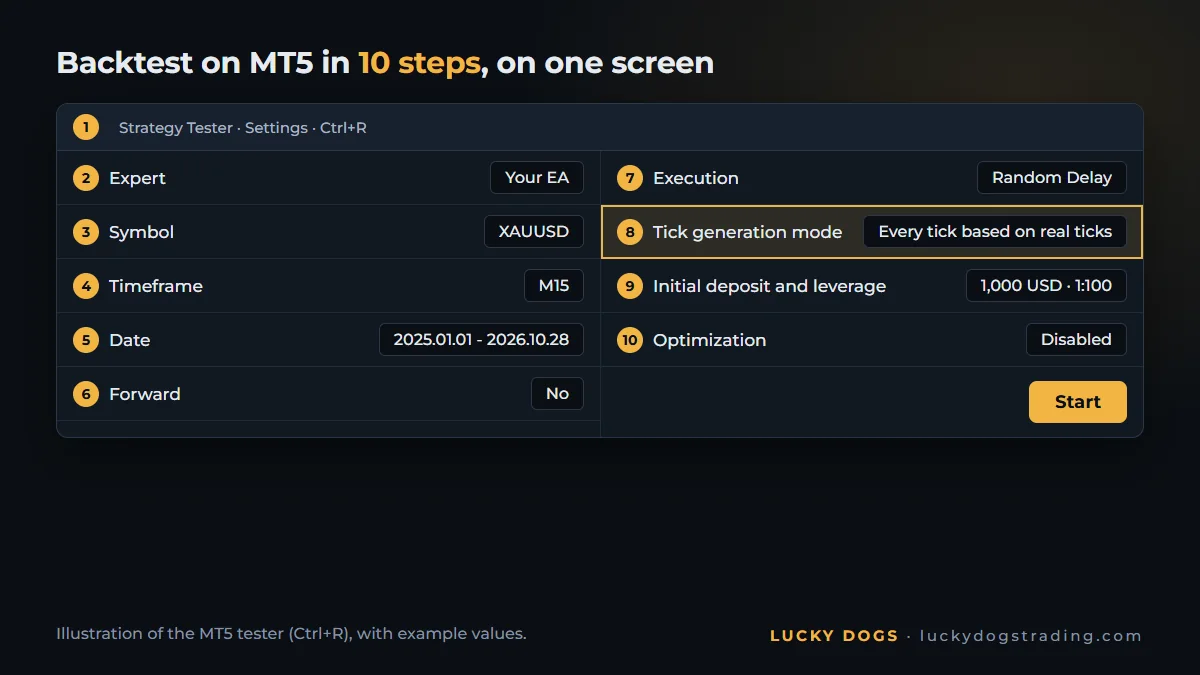
All the fields are on the same screen, the Settings tab of the tester. Follow them in order:
- Open the Strategy Tester with Ctrl+R.
- Expert: choose the EA you are going to test.
- Symbol: gold under your broker's name, such as XAUUSD, GOLD or XAUUSD+.
- Timeframe, next to the symbol: the one the EA asks for on its page. Ours run on any of them.
- Dates of the test: start with the most recent period, such as 2025 and 2026. Further down you will see why.
- Forward: "No" on the first test. The forward has its right moment, explained further down.
- Execution (the delays): if the robot trades fast, switch "No Delay", the ideal execution, to an execution delay. On a real account, every order takes some time to reach the broker.
- Tick generation mode: "Every tick based on real ticks".
- Initial deposit and leverage: the ones you will really use. On an EA that calculates the lot from the balance, the deposit changes the size of each trade. Leverage changes the margin, not the value of each move.
- Optimization off. In the EA's inputs, leave the configuration you will really switch on, or the profile. Click Start.
Why optimization stays off: optimizing means running the robot with hundreds of parameter combinations and keeping the best one. Before you know whether the rule works, all that does is teach the robot to memorize the past. It is mistake 5, further down.
Visual mode: watch the robot trade on the chart
Tick Visualization and the tester opens a chart where the robot trades at the speed you choose. It is the best way to see how it works: where it enters, where it puts the stop, how long it holds and what it does when the price jumps.
To measure the result, untick it. Without the chart, the test runs much faster.
Which modelling to choose in an MT5 backtest
The modelling decides which prices the tester uses to simulate each trade. It is the choice that changes the result of a fast robot the most.
| Modelling | What the tester uses | When it fits |
|---|---|---|
| Every tick based on real ticks | every price the broker recorded | the test that decides, especially for a robot that trades fast |
| Every tick | ticks generated from the 1-minute candles | when there are no real ticks for the period |
| 1 minute OHLC | only the open, high, low and close of each minute | quick screening of an idea |
| Open prices only | only the open price of each candle | robots that decide only at the candle open |
| Math calculations | no prices | calculations, not trading |
The difference between "Every tick" and "Every tick based on real ticks" fits in one sentence: the first imagines the path of the price inside the minute; the second uses the path that happened.
Here is why this matters on gold. A 1-minute candle, as an example: opens at 4,000.00, makes a high of 4,003.00 and a low of 3,997.50, and closes at 3,998.80, below the open. You bought at 4,000.00, with the stop at 3,998.00 and the target at 4,002.50. Both are inside the same candle.
If the price fell first, the trade lost. If it rose first, it won. "1 minute OHLC" knows only the four points and has to assume the order. "Every tick" builds a path, and on a bearish candle like this one it takes the price to the high first: the test books the target and the profit. Only the real tick shows that, in this example, the stop came first.
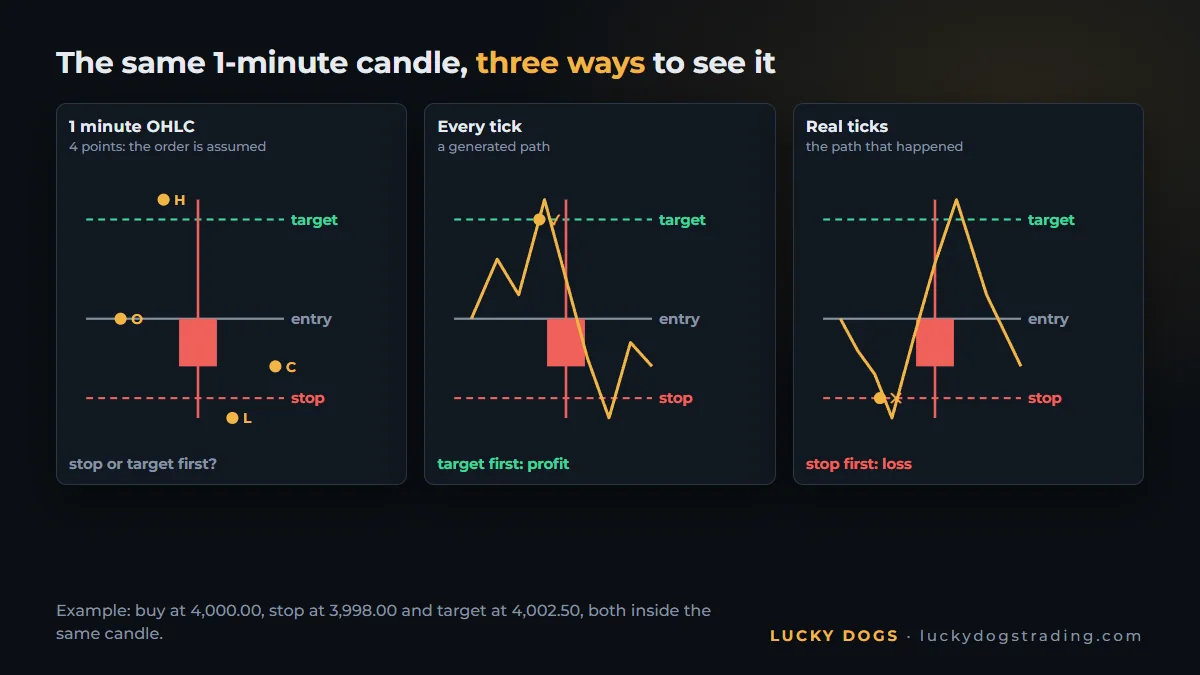
On a robot that trades in minutes, this doubt repeats across hundreds of trades, and that is how a fast test invents profit that never existed. How much the result changes from one mode to another, with numbers, and how to check the quality of the history, are in the guide on 1-minute OHLC or real ticks. Each mode is also described in the official Strategy Tester documentation.
Spread, commission and delay: the cost a backtest has to charge
A test without cost is the test of a market that doesn't exist. Four costs go into the calculation:
- Spread, the difference between the buy price and the sell price. With real ticks, each tick carries the two prices the broker recorded, so the test's spread is the one of each moment, including the one that widens on news. In the generated modes, the tester uses the fixed spread of each 1-minute candle, and the widening of the spread within the minute is left out.
- Commission. Some accounts charge per lot traded. Check in the report whether the test charged commission and whether it matches your account's.
- Delay. It is step 7. Ideal execution doesn't exist on a real account, and on a fast robot the delay changes the price of each entry.
- Swap. A position open at the broker's day rollover pays or receives swap; whoever closes earlier doesn't pay. On a robot that holds positions overnight, this cost has to show up in the test. The tester charges swap at the symbol's current rate, for the whole period.
The rule that fixes all four at once: test on the broker and the account type you will trade on. The history, the spread and the symbol's conditions come from there.
How much history to use in a backtest
The period changes the result as much as the modelling does. Three ideas settle the choice:
- The most recent decides. 2025 and 2026 are the market the robot will meet tomorrow. If the rule doesn't do well in the recent period, the rest of the history doesn't save it.
- The old years show the worst case. That is where the maximum drawdown usually appears, the one that sizes the account. An example of ours, in the real-tick test of Pitbull Gold from January 2021 to October 2026: the maximum continuous drawdown was 49%, in 2024. With 2022 tested alone, it reaches 59%, and the EA's page says to size the account by the larger one. Restarting each year or running straight through gives different drawdowns, and the page shows both.
- Real ticks have a start. Each broker keeps real ticks from a certain date. Before it, the test doesn't have the real path of the price inside the minute. For the test that decides, stay within the stretch that has real ticks.
The routine that works: run 2025 and 2026 first. If it passes, run the whole period your broker has, to find the maximum drawdown. Decide by the recent period and size the account by the maximum drawdown.
How to read the backtest result
When the test finishes, the result appears in the tester's tabs. Four places tell you almost everything:
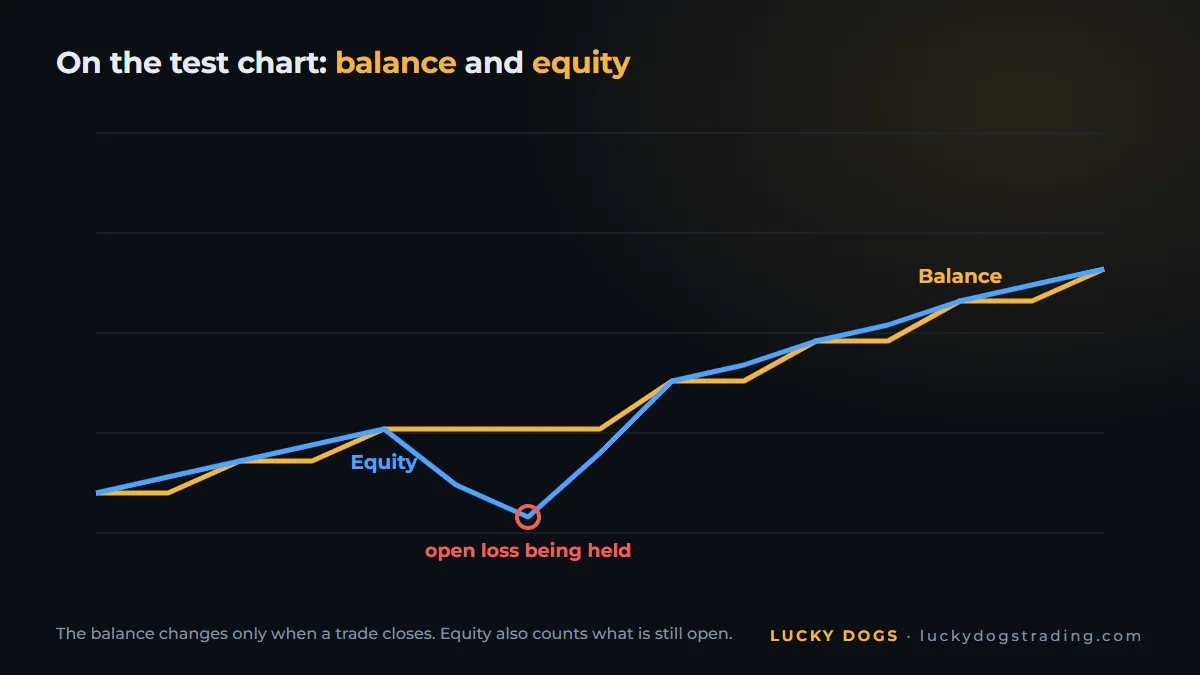
- The graph, with the balance line and the equity line. The balance changes only when a trade closes; equity also counts what is open. Equity sinking below the balance is a losing position being held.
- The report, in the Backtest tab, with the net profit, the profit factor, the maximum drawdown and the number of trades. To read it without mistakes, see the 5 numbers that separate a serious robot from a promise (do forex robots work?).
- The list of orders and deals, at the end of the report, with the time, volume and price of each operation. That is where you see whether the lot doubles after a loss.
- The Journal of the tester, with the messages from the test and the EA. It is the first place to look when something doesn't work.
Backtest, forward test and demo account: what each one proves
Each stage answers a different question, and none replaces another:
| Backtest | Forward test (in the tester) | Live demo account | |
|---|---|---|---|
| Where it runs | Strategy Tester, on history | Strategy Tester, on a stretch at the end of the period that the optimization didn't see | your broker, in real time |
| What it proves | the rule repeats in the past | the rule wasn't fitted only to the past | real execution: spread, slippage, hours, terminal switched on |
| When to use | always, first | when there is optimization | before real money |
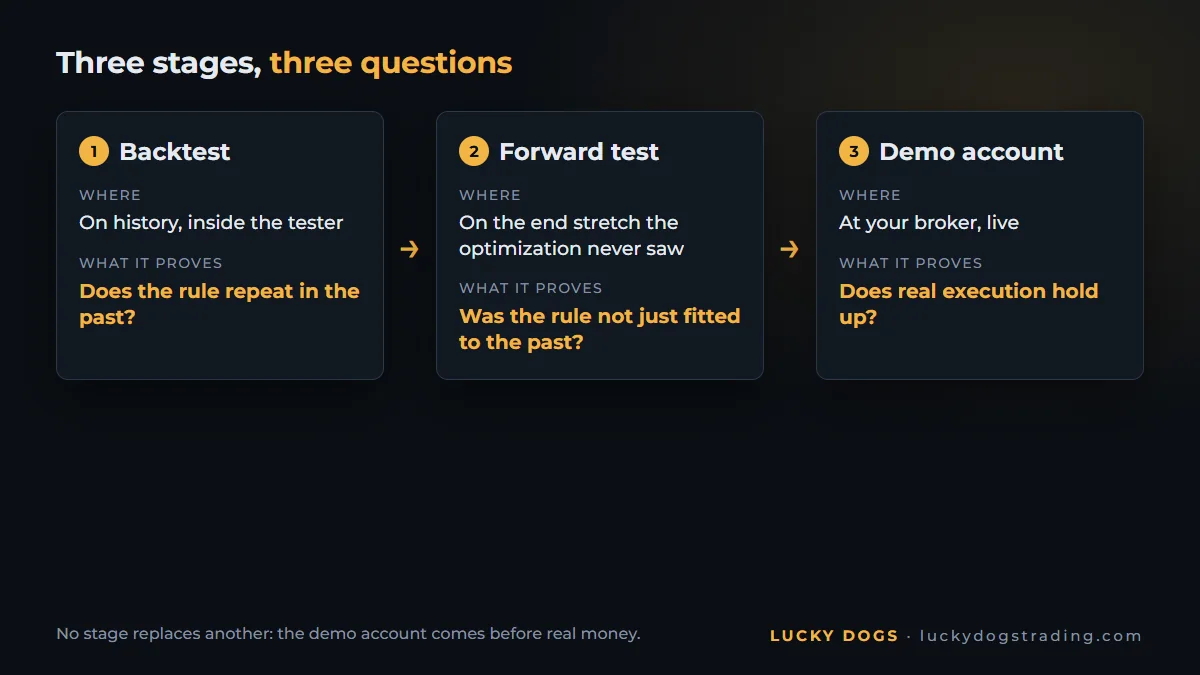
The tester's forward is the "Forward" field in step 6. It holds back a piece of the end of the period: 1/2, 1/3, 1/4 or from a date ("Custom"). The result of that piece appears in the "Forward" tab. The optimization works only on the beginning, and the robot is then tested on the piece it didn't see. If the result collapses on the held-back stretch, the optimization memorized the past.
The demo account is the last stage before real money: live prices, play money and the robot running day and night at your broker. With a paid EA from the Market, the path is the seller's free demo or, when offered, the 1-month rental: run it on a demo account before real money.
The 6 mistakes that make a backtest look too good
- Fast modelling on a fast robot. OHLC or open prices on a robot that trades in minutes invent the order of the prices inside the candle. Instead: "Every tick based on real ticks" in the test that decides.
- A hand-picked period. The good year, without the hard one. Instead: the recent period to decide and the whole history to find the maximum drawdown.
- A deposit or leverage you don't have. With another deposit, the test's lot isn't your account's. Instead: the deposit and leverage you will use.
- Fake cost. Zero delay, a broker different from yours, an account without the commission you pay. Instead: your broker, your account type and an execution delay.
- Optimizing until it fits. Tweaking the parameters until the curve is perfect on the past. Instead: few parameters, forward on and suspicion of the perfect curve. See overfitting: why the robot that is perfect in the test loses on the account.
- Looking only at the balance. The balance hides the open position in the red. Instead: the equity line and the maximum drawdown measured on it.
Test our EAs with real ticks
Everything this guide teaches, you can apply today to our three gold EAs. All three have a free demo that runs in the Strategy Tester, and the sheet for each test is on each EA's page, so you can redo it exactly as it was done: real ticks, real spread and commission.
| EA | Period | Deposit | Broker and symbol | Leverage | Default profile |
|---|---|---|---|---|---|
| Collie Gold | January 2021 to October 22, 2026 | 1,000 USD | Vantage, XAUUSD+ | 1:1000 | Moderate |
| Pitbull Gold | January 2021 to October 31, 2026 | 10,000 USD | Vantage, XAUUSD+ | 1:500 | Balanced |
| Beagle Gold | January 2023 to October 2026 | 10,000 USD | Vantage, XAUUSD+ | 1:100 | Moderate |
One detail helps: the year-by-year table on each page restarts every year with the same deposit. To redo one year, run only that year, with the deposit on the sheet.
And one number for each, in the real-tick test:
- Collie Gold: +586% in 2025 on the Moderate profile. Maximum continuous drawdown: 37%.
- Pitbull Gold: +884% in 2025 on the Balanced profile, and 21 of 22 months in profit in 2025 and 2026. Maximum continuous drawdown: 49%, in 2024.
- Beagle Gold: +184% in 2025 on the Moderate profile, and 21 of 22 months in profit in 2025 and 2026. Maximum continuous drawdown: 27%.
Then switch to your conditions: your deposit, your broker, the most recent period. All three recognize gold under any name and detect the broker's time zone on their own, and choosing the profile is the entire configuration: the test on your broker runs without any other adjustment.
Run 2025 and 2026 with your broker's data and compare with the page: download the demo of all three and compare side by side. If you are choosing between robots from different sellers, follow the buyer's roadmap, from the seller's page to the decision.
Frequently asked questions
Is backtesting on MT5 free?
Yes. The Strategy Tester comes with MetaTrader 5, and the history comes from your broker, at no cost. There is no separate "tester download". And the test runs in your MT5, on your computer or a VPS, not on a website.
Can you backtest on MT5 from a phone?
No. The MT5 phone app has no strategy tester: backtesting belongs to desktop MT5.
Can you backtest manually on MT5?
The Strategy Tester is built to test robots: with Visualization, you watch the robot trade and see each entry on the chart. To practice trading by hand, the simplest route is a demo account, with live prices and play money.
Why does the strategy tester not open any trades?
The four most common causes are: the wrong symbol, a period with no history downloaded, a deposit too small for the minimum lot and a parameter that blocks the entry. The first place to look is the tester's Journal, where the test and the EA write down what happened.
How long does a backtest with real ticks take?
The first test of a period takes longer, because it downloads the broker's ticks. After that, it depends on the length of the period, the robot and your computer. The following tests of the same period are much faster.
Does the backtest result repeat on a real account?
It comes close when the test uses real ticks, your broker and your cost. What stays out is live execution: slippage, the spread on news and the terminal switched off. The normal size of that difference is in the guide on why a real account's result differs, and how much is normal.
A backtest is only as real as the prices it uses. Download the demo of our three EAs, run 2025 and 2026 with real ticks and your broker's data, and compare with the page: our gold EAs, side by side.