Margin Level in MT5: Free Margin, Margin Call and Stop Out
By Fernando Funicelli · Founder of Lucky Dogs Trading Systems

Margin level is your account's equity divided by the margin used, as a percentage: with 1,000 USD of equity and 80 USD of margin, the level is 1,250%. It's the number that tells you how far the account is from the stop out, the point at which the broker starts closing positions on its own.
It lives on one line at the bottom of MetaTrader 5's Trade tab, next to the balance, the equity, the margin and the free margin. Almost nobody looks at that line. Until the day a position closes without you telling it to.
Anyone who discovers the stop out on the day it happens discovers it too late. The position has already closed, and the explanation was on that line nobody read.
Reading the line is easier than it looks, because all these numbers tell the same story: how much of your money is tied up in the lot you opened.
This glossary follows the order in which MT5 shows the numbers, with one example account from start to finish:
- a balance of 1,000 USD;
- leverage of 1:500;
- 0.10 lot of gold open, with gold at 4,000 USD (an example price) and a 100-ounce contract;
- every 1 USD gold moves is worth 10 USD on that lot (what 1 pip is worth in forex and gold).
Balance vs. equity: the difference
- Balance is the account's money without counting open positions. It only changes when a position closes, or when you deposit or withdraw.
- Equity is the balance plus the profit or loss of open positions, right now. MT5 shows it under that same name.
On the example account, gold moves 20 USD against your position. The balance stays at 1,000 USD, because nothing closed. Equity drops to 800 USD: the 1,000 USD minus the 200 USD of open loss.
Equity is what shows the account's real value. That's why it's in the 5 rules we publish every number by: our curves show equity, not just balance.
Used margin: what the broker sets aside for each position
Margin is the part of equity the broker ties up as collateral while the position is open. The math: lots × contract size × price ÷ leverage.
On the example account: 0.10 × 100 × 4,000 ÷ 500 = 80 USD. That's what the broker sets aside to keep the 0.10 lot open. Leverage only enters here, and what leverage changes (and doesn't) in this math has a guide of its own.
The lot moves the margin directly: double the lot, double the margin. With 1 lot, the same account ties up 800 USD.
Free margin: how much is left to open and to hold
Free margin = equity − used margin.
When you open the 0.10 lot, it's 920 USD (1,000 USD − 80 USD). With gold 20 USD against you, it drops to 720 USD (800 USD − 80 USD).
It has two jobs. It's the money available to open new positions. And it's the cushion that absorbs the move against you: every dollar of open loss comes out of it.
The lot decides the size of the cushion: with 1 lot instead of 0.10, free margin on opening drops from 920 USD to 200 USD.
Margin level: what it is and how to calculate it
The formula: margin level = equity ÷ used margin × 100.
It's the same information as free margin, on a scale that works for any account size. Above 100%, there's free margin left. At 100%, it's at zero. Below 100%, it's negative.
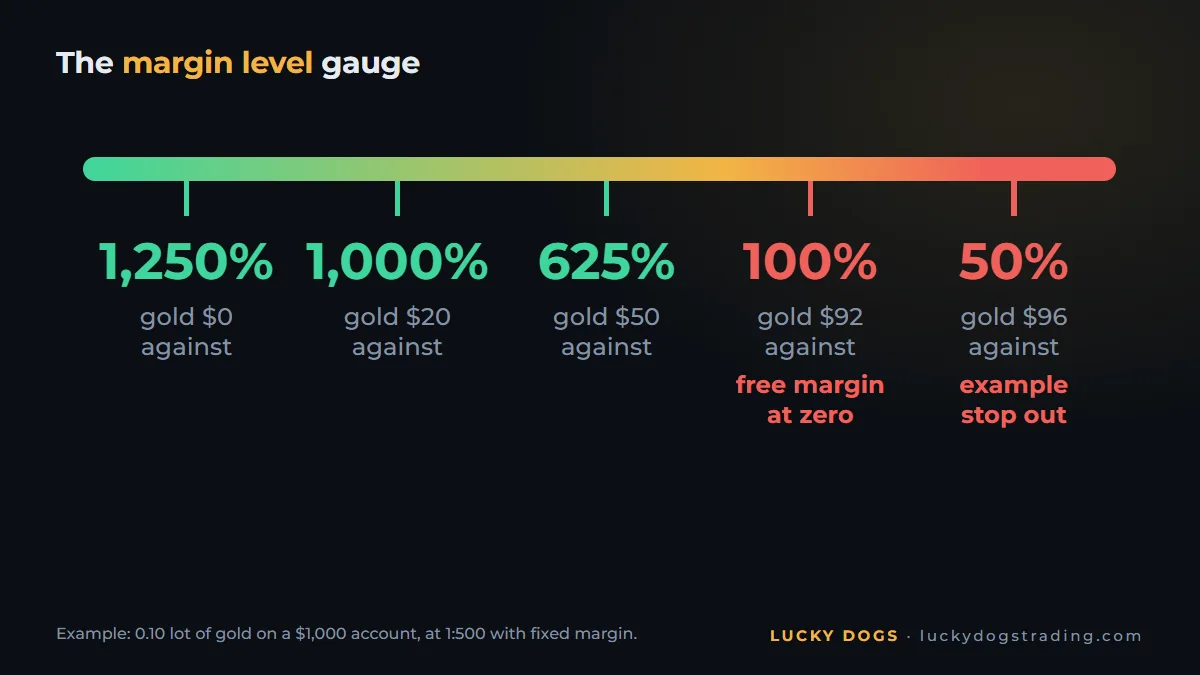
Follow the example account as gold moves against the 0.10 lot. To keep the math simple, the margin stays fixed at 80 USD:
| Gold moves against you | Equity | Free margin | Margin level |
|---|---|---|---|
| 0 USD | 1,000 USD | 920 USD | 1,250% |
| 20 USD | 800 USD | 720 USD | 1,000% |
| 50 USD | 500 USD | 420 USD | 625% |
| 92 USD | 80 USD | 0 USD | 100% |
| 96 USD | 40 USD | −40 USD | 50% |
Look at the 100% row: free margin is at zero, and the account can't open anything else. From there to the example 50% stop out, it only takes 4 USD more.
Margin level only shows when there's an open position: with no margin used, there's nothing to divide by.
Margin call and stop out: what happens at each level
- Margin call is the level at which the broker warns you that the margin is running out. At some brokers, from that point on you also can't open new positions.
- Stop out is the level at which the broker starts closing positions on its own, so the account doesn't go negative. It closes them one by one, starting with the biggest loss, until the level climbs back above the stop out.
Each broker sets both levels. They're on the account conditions page of the broker's website. If you can't find them, ask support and keep the answer in writing.
On the example account, at a broker with a 50% stop out, it arrives when gold moves 96 USD against the position: equity drops to 40 USD, half of the 80 USD margin.
The shortest path there is martingale, which doubles the lot after every loss. Every doubled lot ties up twice the margin and is worth twice as much per dollar of movement. The full math is in martingale strategy in trading: what it is and why it breaks.
The same balance with 0.10 lot and with 1 lot
Now the table that brings it all together. Same account, same leverage, same gold. Only the lot changes:
| On the 1,000 USD account (1:500, gold at 4,000 USD as an example) | 0.10 lot | 1 lot |
|---|---|---|
| Used margin | 80 USD | 800 USD |
| Free margin on opening | 920 USD | 200 USD |
| Margin level on opening | 1,250% | 125% |
| Gold move against you until the level hits 100% | 92 USD | 2 USD |
| Until an example 50% stop out | 96 USD | 6 USD |
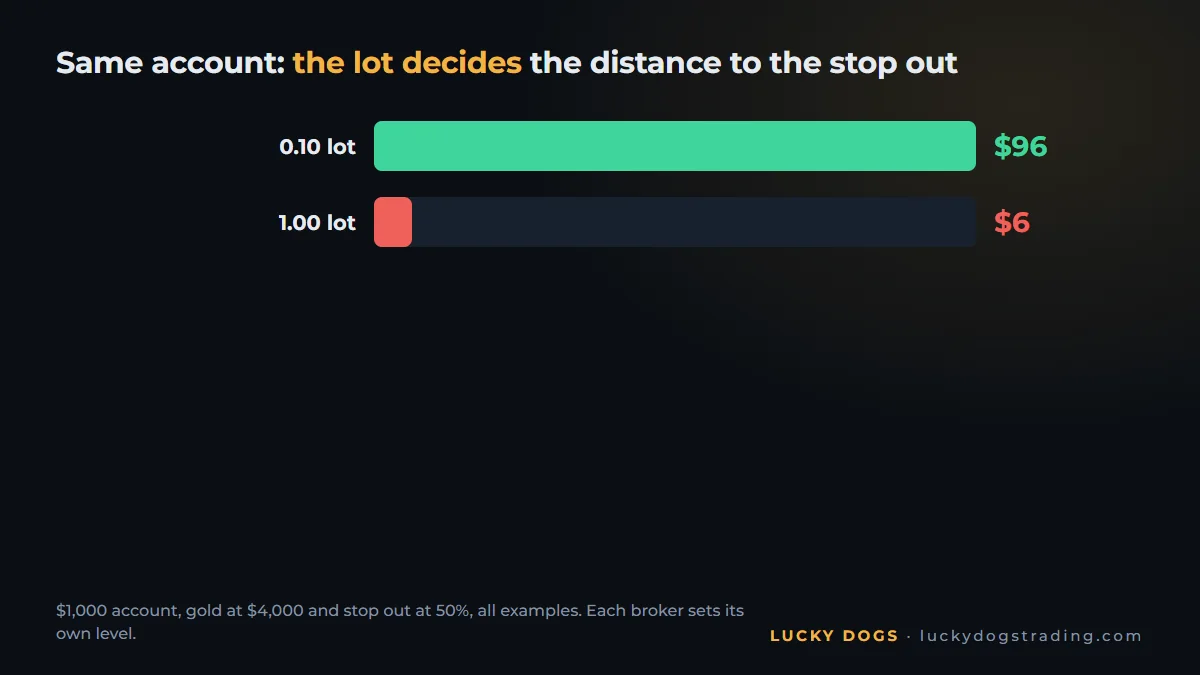
With 1 lot, gold moves 6 USD against you and the broker starts closing. With 0.10, it has to move 96 USD. The account is the same: what changed was the lot.
Drawdown: floating, maximum and relative
Drawdown is the account's drop. Three measures come up all the time:
- Floating: the loss on open positions right now, how far equity is below the balance. On the example account, with gold 20 USD against you, it's 200 USD.
- Maximum: the biggest drop from peak to trough, over a period.
- Relative: that drop as a percentage of the peak.
Drawdown is the yardstick for comparing one robot with another, and it has a guide of its own: what drawdown is, balance or equity, and how far a robot drops.
Where to see these numbers in MT5
- Open the Toolbox with Ctrl+T.
- Click the Trade tab.
- Look at the bottom line, below the positions: Balance, Equity, Margin, Free margin and Margin level, in that order.
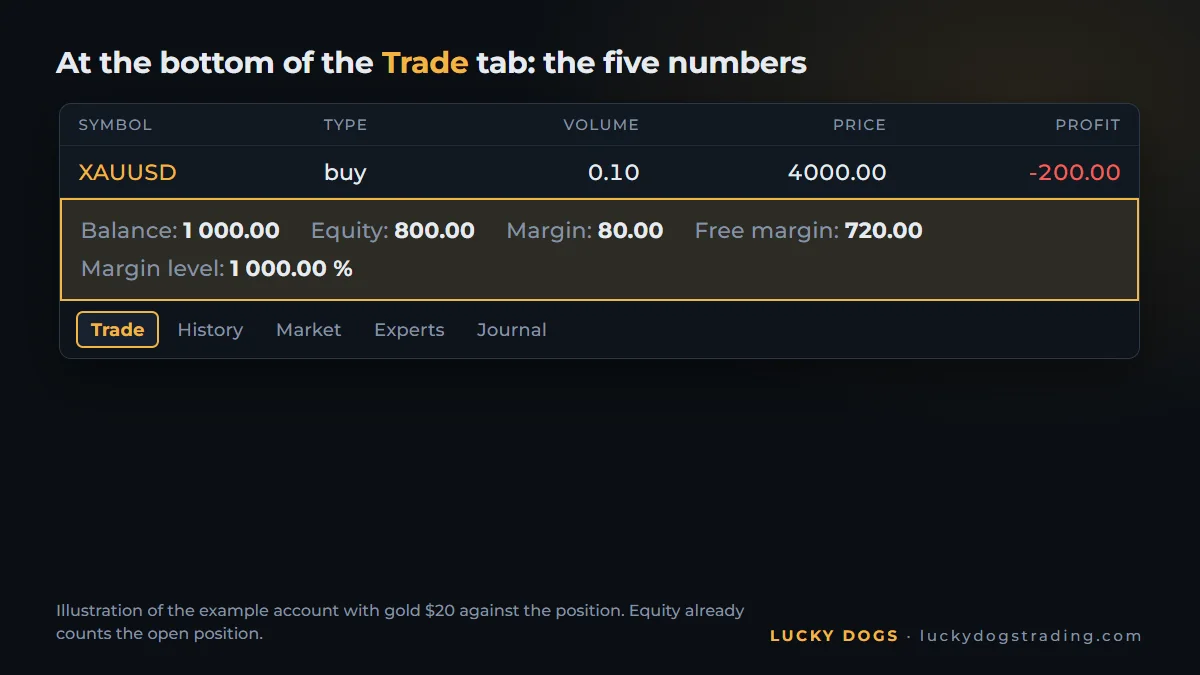
With gold 20 USD against you, the example account shows there: balance 1,000, equity 800, margin 80, free margin 720 and margin level 1,000%. Now you know how to read each one.
How our EAs handle the lot and the margin
Everything in this guide points to the same number: the lot. It decides the margin, the cushion and the distance to the stop out. And it's exactly the number our algorithms control for you.
- The lot comes from the balance. All three EAs trade gold on MetaTrader 5 and size the lot from the balance. Every gain increases the lot of the next trade, and the lot only grows when the balance grows: no doubling after a loss.
- On Beagle Gold, you set the risk. You choose from 1% to 5% of the balance per trade, set before each entry, and it never has more than two trades open at the same time.
- A built-in stop, before the broker's. It's a setting you turn on and calibrate. On Pitbull Gold, the daily loss limit, as a % of the balance at the start of the day, closes the trades and pauses until the next day. On Collie Gold and Beagle Gold, the drawdown protection, as a % of the balance or in money, can close everything and stop the EA. In the prop firm setup, it sits at 4.5%, long before the account gets anywhere near a stop out.
And leverage doesn't get in the way of any of them: at 1:100, Pitbull Gold and Beagle Gold run on any profile, and Collie Gold needs 1:500 or more (at 1:100, Moderate at most).
Frequently asked questions
What is a safe margin level?
There's no number that fits everyone, because it depends on your broker's stop out and the lot you open. A better question: how far does price have to move against you until the stop out, with your lot? On the example account, with 0.10 lot, it's 96 USD; with 1 lot, 6 USD. The further away, the more room.
What should I do with negative free margin?
Negative free margin means equity has fallen below the used margin, so the margin level is below 100%. In that situation, no new position opens. To get room back, there are two ways: close positions, which frees margin, or deposit, which raises equity.
What's the difference between a margin call and a stop out?
The margin call warns. The stop out closes. The first is the alert that the margin is running out; the second is the broker closing positions on its own.
Does the stop out look at balance or equity?
Equity, because it's what counts open positions. An account with its balance intact reaches the stop out if the open loss is big enough.
Does leverage change the margin level?
It changes the used margin and, through it, the level: with the same position, higher leverage means lower margin and a higher level. It doesn't change the value of each move. See what leverage changes (and doesn't).
Why doesn't margin level show in my MT5?
Because it only shows with an open position. With no margin used, there's nothing to divide by.
Margin, level and stop out are the same math seen from three sides, and the lot is the number that moves all three. Our EAs size the lot from the balance, let compounding do its work and come with a built-in loss stop. Compare the three side by side, download the free demo and run 2025 and 2026 in the Strategy Tester, with your broker's data.